Fire TV streamlines World Cup 2026 access

Amazon's Fire TV rolls out a dedicated FIFA World Cup 2026 experience via FOX One, integrating live matches, highlights, and Alexa voice commands for easier access.

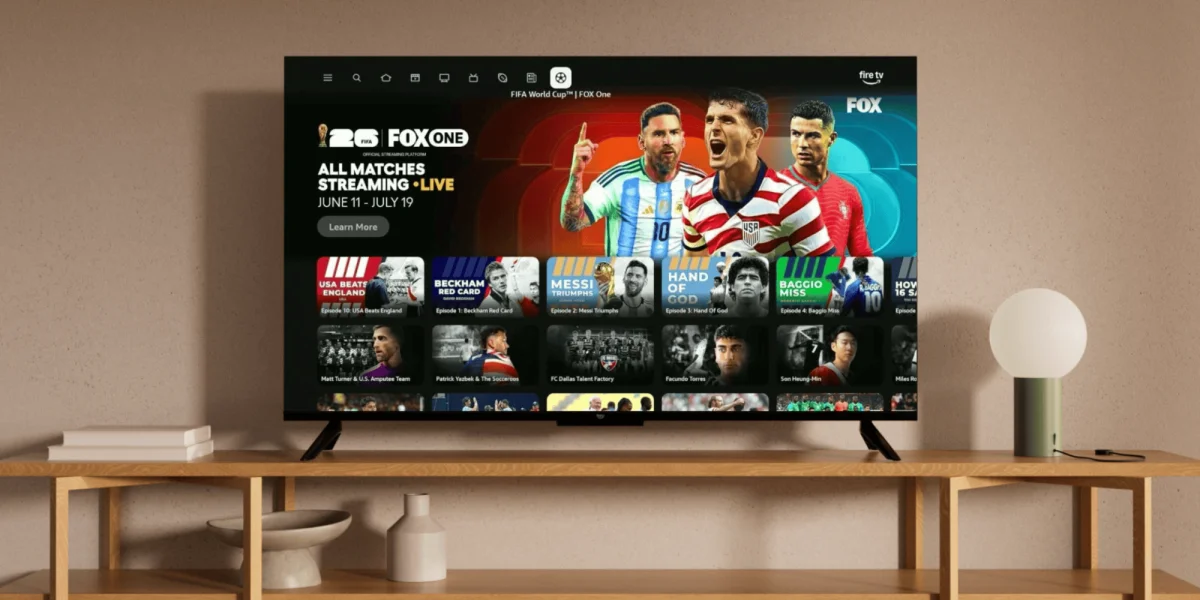
Fire TV interface showing FIFA World Cup 2026 content.
Amazon's Fire TV offers a new dedicated experience for the FIFA World Cup 2026.· Amazon News
Visual TL;DR
Expanded TournamentContext
accommodates the expanded 48-team tournament format
From the article 4 mentionsFor U.S. viewers, this integration promises a more streamlined way to watch the expanded 48-team tournament.
Global ReachEffect
offering free content and global reach for viewers
World Cup 2026 AccessDriver
streamlining access to all 104 matches of the tournament
From the article 5 mentionsAmazon is enhancing its Fire TV platform for the upcoming FIFA World Cup 2026, aiming to simplify access to all 104 matches.
Fire TV ExperienceCore
dedicated FIFA World Cup 2026 experience via FOX One
From the article 8 mentionsVoice commands through Alexa+ are central to the Fire TV FIFA World Cup 2026 experience.
Consolidated ContentEffect
integrates live games, highlights, and replays into one destination
From the articleThe Fire TV Channels app will host additional tournament-related content like news, highlights, and expert commentary.
Alexa+ IntegrationCore
voice commands for seamless navigation and easy access
From the article 4 mentionsFor U.S. viewers, this integration promises a more streamlined way to watch the expanded 48-team tournament.
Simplified ViewingOutcome
eliminates need to jump between multiple apps for tournament
Contents(3)

Amazon is enhancing its Fire TV platform for the upcoming FIFA World Cup 2026, aiming to simplify access to all 104 matches. The new experience, powered by FOX One, the official English-language streaming service in the U.S., consolidates live games, highlights, and replays into an easily navigable destination. This move seeks to eliminate the need to jump between multiple apps to follow the tournament.

Users can find the dedicated World Cup hub on the Fire TV home screen, within the navigation bar, or the sports tab. For U.S. viewers, this integration promises a more streamlined way to watch the expanded 48-team tournament. For those seeking insights into potential outcomes, understanding how to watch FIFA World Cup 2026™ matches might align with strategies found in prediction markets.

Alexa+ Integration for Seamless Navigation

Voice commands through Alexa+ are central to the Fire TV FIFA World Cup 2026 experience. Users can simply ask Alexa to take them to live games, check scores, or retrieve match statistics. This voice-first approach extends to player and team updates, offering quick access to kickoff times, performance data, and even soccer-related movie suggestions.

Free Content and Global Reach

Amazon is also offering select matches for free on Tubi, including the opening game between Mexico and South Africa, and the U.S. Men's National Team's first match against Paraguay. The Fire TV Channels app will host additional tournament-related content like news, highlights, and expert commentary. This initiative extends beyond the U.S., with similar dedicated tournament experiences planned for Brazil, Canada, Mexico, the UK, France, Germany, Italy, and Spain. Even without a subscription, Fire TV customers in the UK and Germany will have access to free highlights and commentary.

Expanded Tournament, Expanded Viewing

The 2026 tournament itself is the largest yet, featuring 48 teams and 104 matches across three host nations. The Fire TV platform's integration with FOX One, and potentially other live TV services via a dedicated tab, aims to ensure fans can follow every moment. This comprehensive approach ensures that viewers can catch up on missed games or jump directly to live action with minimal friction, a significant upgrade for how to watch FIFA World Cup 2026™ games, potentially mirroring the strategic insights available in other high-stakes markets.

© 2026 StartupHub.ai. All rights reserved. You may not republish this article in full without a license. Search engines and AI research tools may crawl and summarize for reference. Bulk reproduction or model training requires a license. See our terms.
Daniel Singer

Written by

Daniel Singer

Editor, StartupHub.ai

Daniel Singer is the editor of StartupHub.ai, a technology expert and thought leader on AI and its applications across sectors, from fintech and healthcare to developer tooling and consumer software. He writes and tests the tools covered here thoroughly and regularly, and built StartupHub.ai to give founders, operators and buyers a clearer read on what they are actually being sold.