Introduction
Counting objects in videos is a challenging Computer Vision task. Unlike counting objects in static images, videos involve additional complexities, since objects can move, become occluded, or appear and disappear at different times, which complicates the counting process.
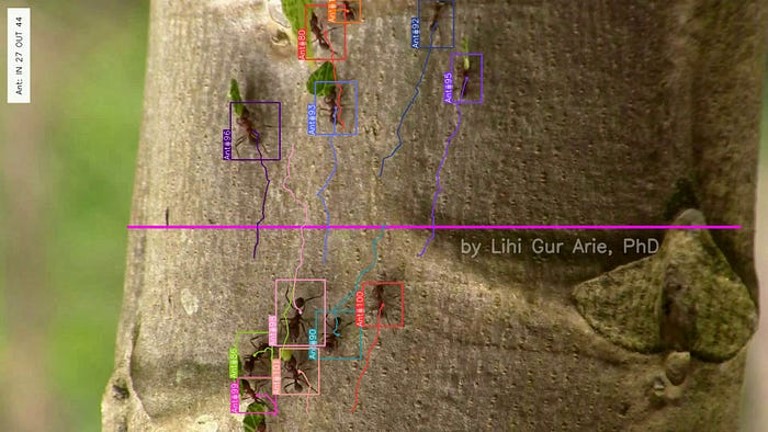
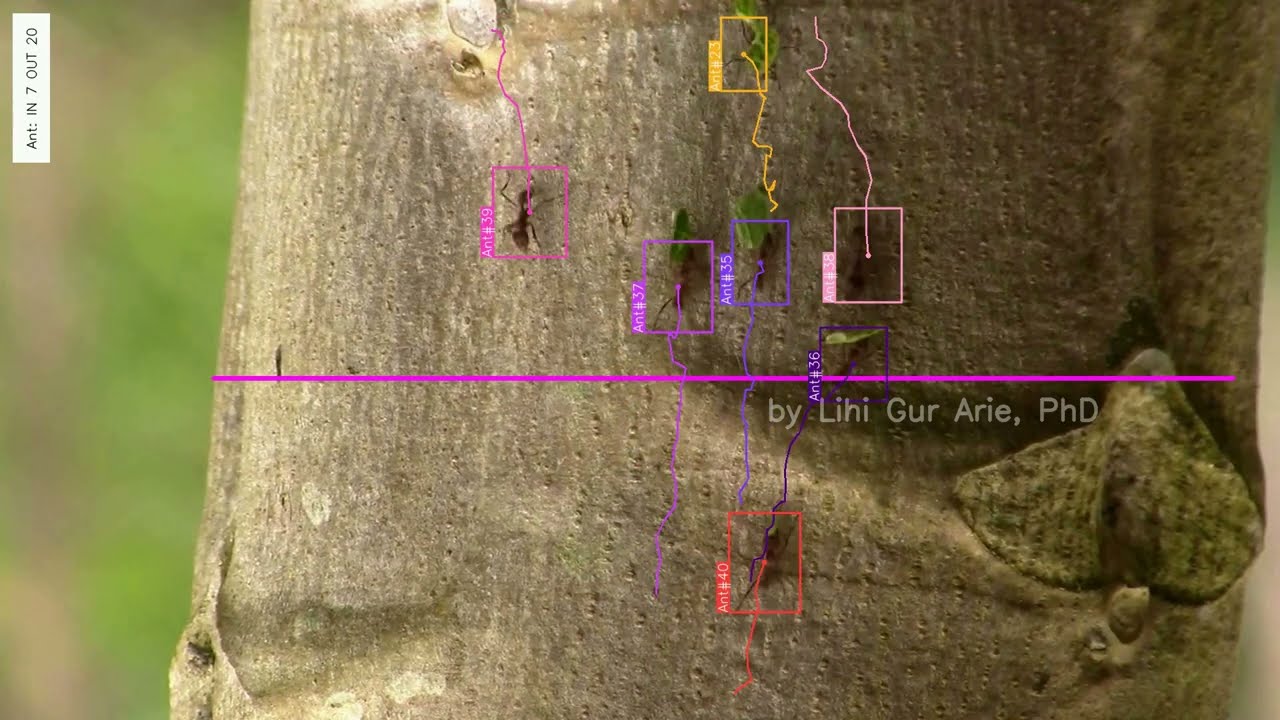
In this tutorial, we’ll demonstrate how to count ants moving along a tree, using Object Detection and tracking techniques. We’ll harness Ultralytics platform to integrate YOLOv8 model for detection, BoT-SORT for tracking, and a line counter to count the ants.
Pipeline Overview
In a typical video object counting pipeline, each frame undergoes a sequence of processes: detection, tracking, and counting. Here’s a brief overview of each step:
- Detection: An object detector identifies and locates objects in each frame, producing bounding boxes around them.
- Tracking: A tracker follows these objects across frames, assigning unique IDs to each object to ensure they are counted only once.
- Counting: The counting module aggregates this information and adds each new object to provide accurate results.

Connecting an object detector, a tracker, and a counter might require extensive coding. Fortunately, the Ultralytics library [1] simplifies this process by providing a convenient pipeline that seamlessly integrates these components.
1. Detecting Objects with YOLOv8
The first step is to detect the ants in each frame produce bounding boxes around them. In this tutorial, we will use a YOLOv8 detector that I trained in advance to detect ants. I used Grounding DINO [2] to label the data, and then I used the annotated data to train the YOLOv8 model. If you want to learn more about training a YOLO model, refer to my previous post on training YOLOv5, as the concepts are similar. For your application, you can use a pre-trained model or train a custom model of your own.
To get started, we need to initialize the detector with the pre-trained weights:
from ultralytics import YOLO

# Initialize YOLOv8 model with pre-trained weights
model = YOLO("/path/to/your/yolo_model.pt")
Later on, we will use the detector to detect ants in each frame within the video loop, integrating the detection with the tracking process.
2. Tracking Objects with BoT-SORT
Since ants appear multiple times across the video frames, it is essential to track each ant and assign it a unique ID, to ensure that each ant is counted only once. Ultralytics supports both BoT-SORT [3] and ByteTrack [4] for tracking.
- ByteTrack: Provides a balance between accuracy and speed, with lower computational complexity. It may not handle occlusions and camera motion as well as BoT-SORT.
- BoT-SORT: Offers improved tracking accuracy and robustness over ByteTrack, especially in challenging scenarios with occlusions and camera motion. However, it comes at the cost of higher computational complexity and lower frame rates.
The choice between these algorithms depends on the specific requirements of your application.
How BoT-SORT Works: BoT-SORT is a multi-object tracker, meaning it can track multiple objects at the same time. It combines motion and appearance information along with camera motion compensation. The objects’ positions are predicted using a Kalman filter, and the matches to existing tracks are based on both their location and visual features. This approach allows BoT-SORT to maintain accurate tracks even in the presence of occlusions or when the camera is moving.
The daily brief
Get the free daily brief with the day's AI news, new AI startups and funding rounds every morning.
Join 64,000 other subscribers.
A well-configured tracker can compensate for the detector’s mild faults. For example if the object detector temporarily fails to detect an ant, the tracker can maintain the ant’s track using motion and appearance cues.
The detector and tracker are used iteratively on each frame within the video loop to produce the tracks. This is how you integrate it into your video processing loop:
tracks = model.track(frame, persist=True, tracker=’botsort.yaml’, iou=0.2)
The tracker configuration is defined in the ‘botsort.yaml’ file. You can adjust these parameters to best fit your needs. To change the tracker to ByteTrack, simply pass ‘bytetrack.yaml’ to the tracker parameter.
Ensure that the Intersection Over Union (IoU) value fits your application requirements; the IoU threshold (used for non-maximum suppression) determines how close detections must be to be considered the same object. The persist=True argument tells the tracker that the current frame is part of a sequence and to expect tracks from the previous frame to persist into the current frame.
3. Counting Objects
Now that we have detected and tracked the ants, the final step is to count the unique ants that crosses a designated line in the video. The ObjectCounter class from the Ultralytics library allows us to define a counting region, which can be a line or a polygon. For this tutorial, we will use a simple line as our counting region. This approach reduces errors by ensuring that an ant is counted only once when it crosses the line, even if its unique ID changes due to tracking errors.
First, we initialize the ObjectCounter before the video loop:
counter = solutions.ObjectCounter(
  view_img=True,                     # Display the image during processing
  reg_pts=[(512, 320), (512, 1850)], # Region of interest points
  classes_names=model.names,         # Class names from the YOLO model
  draw_tracks=True,                  # Draw tracking lines for objects
  line_thickness=2,                  # Thickness of the lines drawn
  )
Inside the video loop, the ObjectCounter will count the tracks produced by the tracker. The points of the line are passed to the counter at the reg_pts parameter, in the [(x1, y1), (x2, y2)] format. When the center point of an ant’s bounding box crosses the line for the first time, it is added to the count according to its trajectory direction. Objects moving in a certain direction counted as ‘In’, and objects moving to the other direction counted as ‘Out’.
  # Use the Object Counter to count new objects
  frame = counter.start_counting(frame, tracks)
Full Code
Now that we have seen the counting components, let’s integrate the code with the video loop and save the resulting video.
# Install and import Required Libraries
%pip install ultralytics
import cv2
from ultralytics import YOLO, solutions

# Define paths:
path_input_video = '/path/to/your/input_video.mp4'
path_output_video = "/path/to/your/output_video.avi"
path_model = "/path/to/your/yolo_model.pt"

# Initialize YOLOv8 Detection Model
model = YOLO(path_model)

# Initialize Object Counter
counter = solutions.ObjectCounter(
  view_img=True,                     # Display the image during processing
  reg_pts=[(512, 320), (512, 1850)], # Region of interest points
  classes_names=model.names,         # Class names from the YOLO model
  draw_tracks=True,                  # Draw tracking lines for objects
  line_thickness=2,                  # Thickness of the lines drawn
  )

# Open the Video File
cap = cv2.VideoCapture(path_input_video)
assert cap.isOpened(), "Error reading video file"

# Initialize the Video Writer to save resulted video
video_writer = cv2.VideoWriter(path_output_video, cv2.VideoWriter_fourcc(*"mp4v"), 30, (1080, 1920))

# itterate over video frames:
frame_count = 0
while cap.isOpened():
  success, frame = cap.read()
  if not success:
    print("Video frame is empty or video processing has been successfully completed.")
    break

  # Perform object tracking on the current frame
  tracks = model.track(frame, persist=True, tracker='botsort.yaml', iou=0.2)

  # Use the Object Counter to count objects in the frame and get the annotated image
  frame = counter.start_counting(frame, tracks)

  # Write the annotated frame to the output video
  video_writer.write(frame)
  frame_count += 1

# Release all Resources:
cap.release()
video_writer.release()
cv2.destroyAllWindows()

# Print counting results:
print(f'In: {counter.in_counts}
Out: {counter.out_counts}
Total: {counter.in_counts + counter.out_counts}')
print(f'Saves output video to {path_output_video}')
The code above integrates object detection and tracking into a video processing loop to save the annotated video. Using OpenCV, we open the input video and set up a video writer for the output. In each frame, we perform object tracking with BoTSORT, count the objects, and annotate the frame. The annotated frames, including bounding boxes, unique IDs, trajectories, and ‘in’ and ‘out’ counts, are saved to the output video. The ‘in’ and ‘out’ counts can be retrieved from counter.in_counts and counter.out_counts, respectively, and are also printed on the output video.

Concluding Remarks
In the annotated video, we correctly counted a total of 85 ants, with 34 entering and 51 exiting. For precise counts, it is crucial that the detector performs well and the tracker is well configured. A well-configured tracker can compensate for detector misses, ensuring continuity in tracking.
In the annotated video we can see that the tracker handled missing detections very well, as evidenced by the disappearance of the bounding box around an ant and its return in subsequent frames with the correct ID. Additionally, tracking mistakes that assigned different IDs to the same object (e.g., ant #42 turning into #48) did not affect the counts since only the ants that cross the line are counted.
In this tutorial, we explored how to count objects in videos using advanced object detection and tracking techniques. We utilized YOLOv8 for detecting ants and BoT-SORT for robust tracking, all integrated seamlessly with the Ultralytics library.
Thank you for reading!
Congratulations on making it all the way here. Click 👍 to show your appreciation and raise the algorithm self esteem 🤓
Want to learn more?
- Explore additional articles I’ve written
- Subscribe to get notified when I publish articles
- Follow me on Linkedin
References
- [1] Ultralytics GitHub
- [2] Grounding DINO: Marrying DINO with Grounded Pre-Training for Open-Set Object Detection
- [3] BoT-SORT: Robust Associations Multi-Pedestrian Tracking
- [4] ByteTrack: Multi-Object Tracking by Associating Every Detection Box
Originally published on Dr. Lihi Gur-Arie's Towards Data Science account, here.



