

Brave vs Chrome performance 2026: 44% less CPU

Brave's Mac Mini tests show 44% less CPU and 20% faster loads than Chrome, with LCP tied at 2.4 seconds.

Brave vs Chrome performance 2026 desktop benchmark comparison on Mac Mini
Brave averaged lower CPU, memory and load times than Chrome, Edge and Firefox in controlled Mac Mini testing.· Brave
Contents(7)

Brave says its latest Brave vs Chrome performance 2026 testing shows the desktop browser beating Chrome, Edge and Firefox on speed, CPU, memory and network use.

Companies working on this

StartupHub profiles of the companies this article names, with funding and a one-liner from our database.


Brave
$980M
A privacy-focused browser and search engine that blocks ads and trackers, rewarding users with cryptocurrency.
Apple
$6.2B
Global technology leader in consumer electronics, software, and online services.

Tests ran on an Apple Mac Mini with an M2 chip and 8 GB of unified memory on macOS 26.5.1, over a dedicated 50 Mbps connection in London.

How the blocking works

All four browsers loaded the same 50 top sites, ranked by Brave Search, ten times each in randomized order with clean profiles and a 60 second stabilization window between runs.

The lineup: Brave 1.92.139, Chrome 150.0.7871.184, Edge 150.0.4078.83 and Firefox 146.0.1. Everything was automated through Playwright 1.58.2, with powermetrics for energy at 350 ms and ps aggregation for CPU and RSS.

Think of Brave's Shields as a bouncer who turns away ad, tracker and analytics payloads at the door, so the kitchen never has to cook them.

Why it matters, and where it doesn't apply

For builders, less CPU and less outbound data means background trackers and beacons never serialize, execute or transmit. That saves energy and reduces the amount of exploitable third party code running on each page.

Brave averaged 31.1 mWh per load, compared with 32.5 for Chrome, 35.3 for Edge and 36.1 for Firefox, and it held a tighter distribution across sites.

Memory averaged about 1,200 MB for Brave versus roughly 1,750 MB for Chrome, 1,620 MB for Edge and 1,650 MB for Firefox.

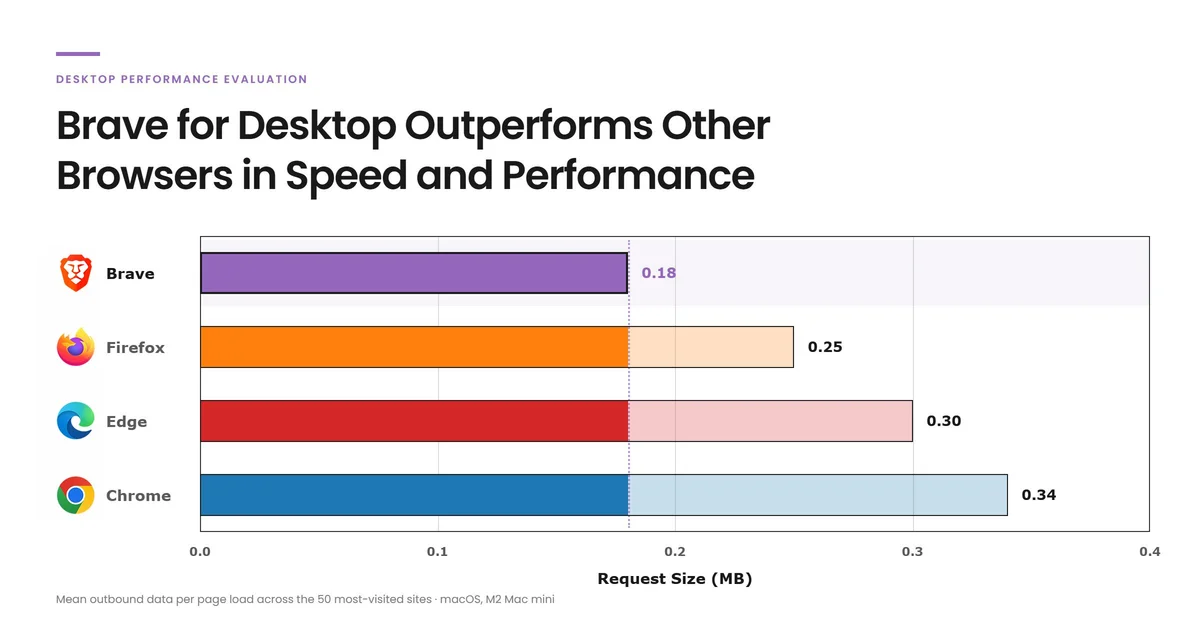
Inbound data averaged 4.4 MB for Brave versus 4.8 MB for Chrome, 6.3 MB for Firefox and 6.8 MB for Edge. Outbound averaged 0.18 MB for Brave versus 0.34 MB for Chrome, 0.30 MB for Edge and 0.25 MB for Firefox.

Largest Contentful Paint was essentially tied at around 2.4 seconds for Brave and Chrome, and about 2.5 seconds for Edge and Firefox. The page appears at the same time, but Brave finishes its background work sooner.

The gap isn't fixed for everyone. Results reflect a single Mac configuration, default settings and landing pages only, with no extensions, logged in sessions or long lived background processes in the mix.

So which should you actually use

Brave wins on measured resource use, with 44% less CPU on average and a 20% faster loadEventEnd at 4.4 seconds versus 5.1 seconds for Chrome.

Chrome matches Brave on LCP at about 2.4 seconds, so visual readiness is similar.

Pick Brave if you want lower CPU, memory and network overhead from blocked trackers. Stick with Chrome if your workflow depends on Chrome specific enterprise policies or extensions.

For metered connections or device fleets, that reduced transfer can lower bandwidth and energy spend without a license fee.

How features stack up

Brave ships native adblocking and tracker blocking, and the tests credit that for fewer requests, less parsing and lower CPU.

Chrome leans on extensions or optional modes for similar blocking, which adds overhead that native filtering avoids.

Feature trades still apply, since Chrome leads on enterprise management and extension ecosystem breadth.

What about Edge and Firefox

Against this workload, Brave beat both alternatives on CPU, memory, energy and load time.

Firefox averaged about 78% CPU with peaks near 100% and the widest energy spread, while Edge averaged 6.0 seconds to loadEventEnd with the widest latency range.

On synthetic benchmarks like Speedometer 3.1, JetStream 2.2 and MotionMark 1.3.1, the differences narrow, because those tests skip the real world third party content where blocking helps most.

© 2026 StartupHub.ai. All rights reserved. You may not republish this article in full without a license. Search engines and AI research tools may crawl and summarize for reference. Bulk reproduction or model training requires a license. See our terms.
Daniel Singer

Written by

Daniel Singer

Editor, StartupHub.ai

Daniel Singer is the editor of StartupHub.ai, a technology expert and thought leader on AI and its applications across sectors, from fintech and healthcare to developer tooling and consumer software. He writes and tests the tools covered here thoroughly and regularly, and built StartupHub.ai to give founders, operators and buyers a clearer read on what they are actually being sold.

More from Daniel Singer

Startups in this story

Profiles for the companies named above.