


OpenAI Brings Codex AI to Windows

OpenAI launches its Codex AI coding assistant as a native Windows application, offering enhanced integration, skills, and automation for developers.

Mar 5 at 9:46 PM3 min read
Man speaking in front of a laptop displaying the Codex application interface on Windows

OpenAI has officially launched its Codex application for Windows, bringing its powerful AI code assistant directly to the desktop environment. This move aims to make AI-driven code generation and assistance more accessible and integrated for developers working on the Windows platform. The application provides a centralized hub for managing code-related tasks, leveraging AI to streamline workflows and boost productivity.

Introducing the Codex Windows App

The newly released Codex app for Windows is designed to embed AI capabilities throughout the development lifecycle. It acts as a central point for interacting with Codex, offering features that aim to simplify complex coding tasks, manage projects, and automate repetitive processes. The interface allows users to initiate new threads for coding assistance, manage existing projects, and explore various AI-powered tools and skills.
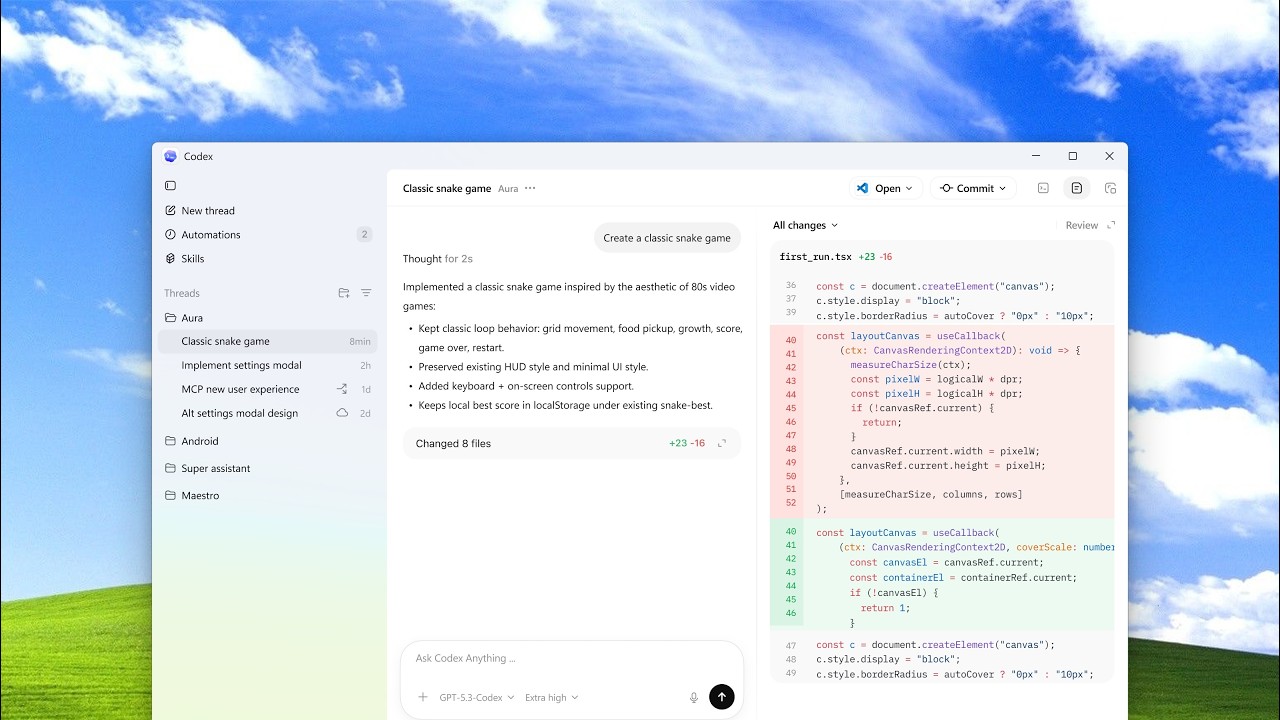
The full discussion can be found on OpenAI Youtube's YouTube channel.

The Codex app is now on Windows — from OpenAI Youtube

Key Features and Functionality

The Codex Windows app introduces several key functionalities, including:

  • Threads: A system for managing ongoing coding conversations and tasks, allowing developers to track progress and context for different projects.
  • Automations: The ability to set up recurring tasks that Codex can perform in the background, such as daily bug scans or summarizing Git activity, freeing up developer time.
  • Skills: A curated gallery of specialized AI tools that can be installed and utilized for specific development needs. This includes skills for UI design, app development, code review, and more, with a particular focus on Windows-specific development like WinUI apps.
  • Worktrees: Functionality to manage multiple, independent tasks within the same project, allowing for parallel development and better organization.
  • QuickEdit: A built-in editor that provides a notepad-like experience for code snippets and basic editing, integrated directly within the Codex environment.

Enhanced Windows Integration

A significant aspect of the Codex Windows app is its deep integration with the operating system. Developers can choose their preferred agent environment, opting for a Windows native experience or running the agent inside the Windows Subsystem for Linux (WSL). Furthermore, users can select their integrated terminal shell, with options including PowerShell, Command Prompt, Git Bash, and WSL, providing flexibility to match existing development preferences.

The application also offers customization options for the user interface, including theme selection (light, dark, or system match) and pointer color adjustments. These settings are accessible through the app's configuration panel, allowing users to tailor the experience to their liking.

Extending AI Capabilities to Developers

OpenAI's goal with the Codex app on Windows is to make its AI model available wherever developers build. The statement, "Our goal is for Codex to be everywhere you build," underscores this ambition. By providing a native Windows application, OpenAI aims to reduce friction and make AI-assisted coding a seamless part of the developer's workflow, regardless of their operating system preference.

The app also emphasizes the ability to integrate with existing tools and workflows. For instance, the ability to "Use Figma MCP for design-to-code work" highlights how Codex can connect with design tools, and the "WinUI App" skill demonstrates its utility for modern Windows application development.

Accessibility and Availability

The Codex app is available for download from the Microsoft Store or directly from OpenAI's website at openai.com/codex. Users can sign in with their existing ChatGPT Plus subscription or use an API key to access the AI features. This broad availability aims to put the power of Codex into the hands of a wider developer community.