

YC QM Agent Harness: A Collaborative AI Shift

Y Combinator's new open-source QM project introduces a multiplayer agent harness for startups, focusing on collaborative AI with isolated workspaces and flexible model integration.

4 min read
YC QM Agent Harness discussion on AI application processing and LLM integration
A social media conversation discussing the YC QM Agent Harness and the role of AI in applications.

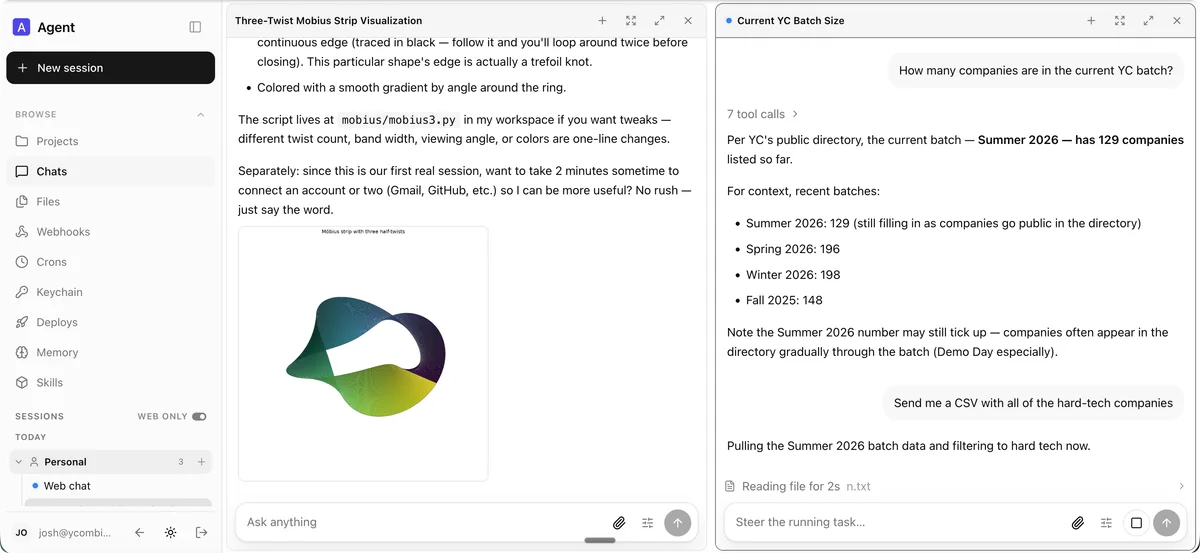
Y Combinator's new open-source project, QM, introduces a multiplayer agent harness designed specifically for startup environments. This system departs from the common personal assistant model for AI agents. Instead, QM focuses on collaboration, allowing employees to work independently with their own isolated AI workspaces while also facilitating group work in shared channels and projects.

QM's Design for Collaborative AI

QM provides each user and each communication room with its own scoped memory, file system, keychain view, permissions, cron jobs, web applications, and a durable sandbox. This isolation ensures that individual agent interactions do not interfere with others. Employees can customize their agents, making them personal tools, yet still collaborate effectively within Slack channels and web applications.

The project emphasizes an open-source approach. It allows organizations to select and switch between various AI harnesses and models, including Pi, OpenCode, Codex, and Claude Code. This flexibility means a deployment is not tied to a single vendor, providing significant adaptability for startups experimenting with different AI capabilities. For context, Open-source AI tools for startups like QM aim to democratize access to advanced AI.

Core Features and Capabilities

QM integrates both personal and shared scopes, allowing for individual customization and collaborative team work. The same identity and configuration persist across both Slack and the web application. Administrators gain control over organizational configurations, security postures, and the availability of specific harnesses and models.

The platform supports spinning up custom internal web applications and publishing them to relevant personnel. Shared skills are scope-owned and can be granted to others, with admin-gated promotion to the entire organization. Skill packs can also be imported directly from Git repositories. Background work, such as crons and watches, ensures tasks run continuously even when no one is actively monitoring them.

QM enables users to search internal notes, emails, documents, databases, and the web collectively. It can retrieve information from a company's internal knowledge base, build and publish internal apps, and even learn a user's writing voice to triage inboxes. For engineers, it can work within existing repositories, run tests, open pull requests, monitor CI, and check system logs. This YC QM agent harness facilitates a wide range of operational tasks.

Architecture and Security Posture

QM's architecture routes every agent turn through a central core. This core can utilize various models and harnesses to generate responses. A PostgreSQL persistence layer stores user data, session history, and other durable states. The agent's fixed tool surface includes an 'execute' tool, which runs commands within an isolated, durable sandbox specific to each scope.

The core is generic, written in TypeScript on Node with Fastify for HTTP. Company-specific configurations, custom tools, skills, sandbox images, and infrastructure reside in a deployment directory validated by the QM CLI. This allows for clear separation between the core system and organizational customizations.

Security is handled through defined postures. 'Strict' requires human approval for nearly all harness tool calls. 'Auto' (the default) uses a classifier to screen external data and tool results before they reach the model. 'Dangerous' removes content screening and pauses. A predeclared command policy, including approval rules and hard denials for destructive actions like recursive deletes or SQL operations, applies across all postures. StartupHub.ai data shows that Slack, a platform QM integrates with, has a score of 67/100, indicating a strong existing ecosystem for such agent integrations.

Deployment and Contributions

Organizations deploy QM by creating an organization-owned deployment repository that depends on @yc-software/qm. The initialization process guides users through infrastructure setup, web sign-in, connector credentials, and optional Slack access. Each deployment runs in the operator's own cloud account, emphasizing self-hosting and control.

Contributions to QM are accepted as human-written text, not direct code. This involves describing desired changes informally in text files, with the QM team handling implementation if aligned. This approach aims to maintain code quality and architectural consistency while still benefiting from community input.

For deeper customization, organizations can maintain a private fork of the QM codebase. This allows engineers to read core and customizations together, keeping proprietary changes private. Two specific skills, update-qm and upstream-pr, help manage the boundary, facilitating merges from upstream and sending organization-agnostic fixes back to the main QM project.

© 2026 StartupHub.ai. All rights reserved. Do not enter, scrape, copy, reproduce, or republish this article in whole or in part. Use as input to AI training, fine-tuning, retrieval-augmented generation, or any machine-learning system is prohibited without written license. Substantially-similar derivative works will be pursued to the fullest extent of applicable copyright, database, and computer-misuse laws. See our terms.