

LLMs are the new orange and allow individual developers to easily develop capabilities that until a year or two ago were the property of large ML teams, at best.
In the next series of posts, we will try to characterize, from the software engineering side, what the architecture of LLM systems means, that is: when we build systems that utilize LLM — what are the common and logical structures of the software around them.
Let’s start with a basic example
At the most basic level, a system using LLM looks like this:
Our system sends a prompt (text) to the LLM model. The model can be SaaS (such as OpenAI) or managed in self-hosting like various open-source models.
The LLM will process the prompt — and return a textual response.
Of course, since we didn’t do anything special with the prompt, we created yet another chat application in the form of ChatGPT or Gemini. We could add a nicer UI, or ringtones at the right moments but at the base, this is just another Chat app — not something new.
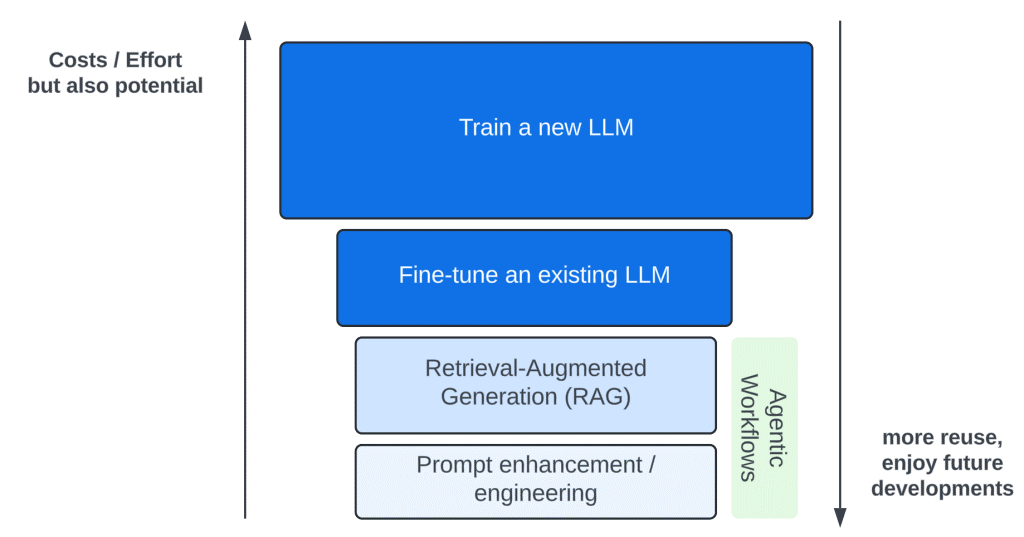
There are four principal ways to influence the LLM model — to introduce new capabilities (marked in the diagram in blue shades):
Training a new model, and fine-tuning an existing model are efforts that require a lot of resources and expertise. Tens of thousands of dollars to fine-tune a small model to many millions to train a new large model.
It seems that about 99% of the LLM-based solutions are based on the two simple and available practices: Prompt Engineering and RAG — which we will focus on in the post. These are very cheap techniques, which can be used with a small investment and without intimate LLM knowledge.
Agentic workflows are a series of Patterns of using Prompt Engineering and RAG to achieve better results. We will discuss them later.
We will start by describing a minimal LLM-based solution, one that a single developer can develop, in a short time. We will do this with the most basic tool — Prompt Engineering.
Pay attention to the following Prompt template:
prompt_template = """You are a teacher grading a question.
You are given a question, the student's answer, and the true answer,
and are asked to score the student answer as either Correct or Incorrect.
Grade the student answers based ONLY on their factual accuracy.
Ignore differences in punctuation and phrasing between the student answer
and true answer.
It is OK if the student answer contains more information than the true answer,
as long as it does not contain any conflicting statements.
If the student answers that there is no specific information provided in
the context, then the answer is Incorrect. Begin!
QUESTION: {question}
STUDENT ANSWER: {studentAnswer}
TRUE ANSWER: {trueAnswer}
GRADE:
Your response should be as follows:
GRADE: (Correct or Incorrect)
(line break)
JUSTIFICATION: (Without mentioning the student/teacher framing of this prompt,
explain why the STUDENT ANSWER is Correct or Incorrect. Use up to five
sentences maximum. Keep the answer as concise as possible.)
"""
If we place values for the parameters question, studentAnswer, and trueAnser in the correct places and send it to LLM to process the answer — it will return to us an analysis of whether the answer is correct or not, and an explanation of why.
In practice: we created a focused and useful function, which did not exist before — checking the correctness of an answer.
For a question in history, such as “List the main causes of the outbreak of the First World War” — we can solve with a little effort a problem that will be very difficult to solve using imperative programming (e.g. java/python code). Analyzing the text, understanding its semantics and matching it to the example text (the correct answer) is a difficult problem to solve using conventional programming, and even challenging using common NLP (Natural Language Processing) techniques.
With the help of LLM and a little prompt engineering — this becomes a simple task.
